Hunyuan3D-1 for Plant Images: A Reproducible Exploration Guide
A version-specific, evidence-aware workflow for generating exploratory plant meshes with Hunyuan3D-1 and validating why generative 3D output is not automatically a phenotype measurement.
 Liangchao DengPostdoctoral Researcher
Hunyuan3D-1 is a generative image-to-3D and text-to-3D system released by Tencent. It can create a textured 3D asset from a single plant photograph, which makes it useful for visualization, hypothesis generation, and studying the behavior of generative 3D models.
It is not a calibrated reconstruction system by default. A single image does not observe the back of a plant, an absolute scale, or structures hidden by leaves. The model must infer those regions, so its output cannot be treated as measured plant height, leaf area, branch count, or organ geometry without independent validation.
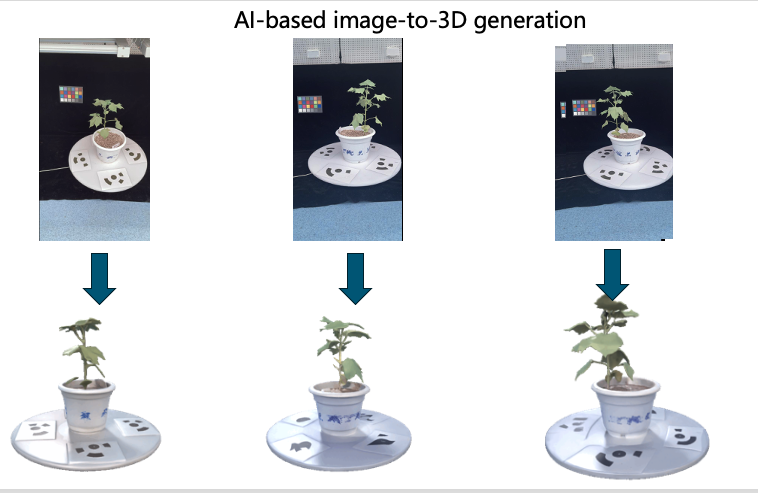
Use generated meshes as model outputs. Do not present inferred, invisible geometry as an observation. For metric phenotyping, compare against multi-view photogrammetry, depth sensing, laser scanning, or manual measurements collected with a documented scale.
Scope and version
This guide documents the public Hunyuan3D-1 workflow so an older experiment can be reproduced. It deliberately does not invent a generic Transformers API: Hunyuan3D-1 uses its own repository, weight layout, environment scripts, and main.py entry point.
Check the upstream Hunyuan3D-1 repository and Hugging Face model card before installation. Newer Hunyuan3D releases have different code and hardware requirements; do not mix commands between generations.
1. Decide whether the method fits the question
| Question | Hunyuan3D-1 suitability |
|---|---|
| Can a generative model create a plausible plant-like asset? | Suitable for exploratory analysis |
| Can it support an interactive visualization or synthetic scene? | Potentially suitable after mesh inspection |
| What is the true height, leaf angle, or branch count of this plant? | Not suitable without calibrated reference data and validation |
| How does plant structure change over time? | A single-image generative output is not a reliable longitudinal measurement |
| Does the model generalize across species and growth stages? | Requires a pre-registered, independently labeled evaluation dataset |
2. Prepare an auditable input set
For each plant image, retain:
- the untouched original and metadata;
- species or genotype and growth stage, if authorized for release;
- camera and lighting information;
- a background-removal method and its version;
- an image identifier that links generated assets to source data;
- consent and license information for any non-original images.
Use a simple background with the complete visible plant in frame. Background removal may improve conditioning, but it does not reveal occluded organs or create metric scale.
Create a small pilot set first. Include easy examples, dense canopies, thin leaves, overlapping organs, and images from species not represented in the development set.
3. Install the official Hunyuan3D-1 workflow
The commands below mirror the upstream project structure. They assume Linux with a compatible NVIDIA environment; choose the PyTorch build that matches the installed driver and CUDA runtime.
git clone https://github.com/tencent/Hunyuan3D-1
cd Hunyuan3D-1

conda create -n hunyuan3d-1 python=3.10
conda activate hunyuan3d-1
which python
which pip

# Install the compatible PyTorch build first, following pytorch.org.
bash env_install.sh
python -m pip install "huggingface_hub[cli]"
Download the official weights into the layout expected by the repository:
mkdir -p weights
huggingface-cli download tencent/Hunyuan3D-1 --local-dir ./weights

mkdir -p weights/hunyuanDiT
huggingface-cli download Tencent-Hunyuan/HunyuanDiT-v1.1-Diffusers-Distilled \
  --local-dir ./weights/hunyuanDiT
Record the Git commit and downloaded model revisions:
git rev-parse HEAD
huggingface-cli env
python -m pip freeze > environment-lock.txt
The complete pipeline is GPU-intensive. Consult the upstream model card for the current standard, lite, split-pipeline, and memory-saving options. A successful Open3D installation or a random point-cloud visualization does not demonstrate that Hunyuan3D inference will run.
4. Generate one image-conditioned asset
Run the repository entry point instead of calling nonexistent methods such as AutoModel.generate_point_cloud:
python3 main.py \
  --image_prompt "/absolute/path/to/plant.png" \
  --save_folder ./outputs/plant-001/ \
  --max_faces_num 90000 \
  --do_texture_mapping \
  --do_render
Start with one image and inspect the entire output directory before attempting a batch. Save the command, random seed, runtime, peak GPU memory, warnings, and failure status for every sample.
The primary output is a generated mesh and render assets, not a measured point cloud. If a downstream application requires points, sample them from the mesh while preserving that provenance:
import open3d as o3d

mesh = o3d.io.read_triangle_mesh("generated_mesh.obj")
if mesh.is_empty():
    raise ValueError("The generated mesh could not be loaded")

mesh.compute_vertex_normals()
points = mesh.sample_points_poisson_disk(number_of_points=100_000)
o3d.io.write_point_cloud("generated_mesh_sampled.ply", points)
Replace generated_mesh.obj with the actual output filename. Sampling a mesh creates a point representation of the same generated surface; it does not make the geometry more accurate.
5. Evaluate plant outputs honestly
Visual quality review
Score predefined criteria instead of selecting only attractive outputs:
- silhouette consistency with the visible image;
- missing, duplicated, fused, or disconnected organs;
- stem and branch continuity;
- texture leakage and background artifacts;
- plausibility of the inferred back side;
- stability across seeds and small image perturbations.
Geometric validation
If the research claim concerns geometry, collect an independently scaled reference for the same specimen. Align only with a documented procedure, then report:
- the number of successful and failed generations;
- scale and registration method;
- surface or point distance with units;
- trait error for each biological unit;
- performance by species, growth stage, and occlusion level;
- sensitivity to seed, crop, background, and input view;
- confidence intervals or repeated-run variability.
Do not report benchmark numbers unless the dataset, split, baseline, code, and evaluation definition are available.
6. Reproducibility record
Save a manifest such as:
{
  "sample_id": "plant-001",
  "source_image": "plant-001.png",
  "repository_commit": "<git-commit>",
  "model_revision": "<model-revision>",
  "seed": 0,
  "command": "python3 main.py ...",
  "status": "success",
  "intended_use": "exploratory visualization",
  "metric_validation": false
}
Store failed generations too. Excluding them after inspection produces a misleading estimate of robustness.
Known limitations
- Invisible and occluded geometry is inferred rather than observed.
- Generated assets do not contain an automatic physical scale.
- Thin leaves, petioles, branching junctions, and repeated textures are difficult cases.
- A visually plausible mesh can still be geometrically wrong.
- Output quality may vary with segmentation, background, seed, and input view.
- Training-data coverage and species-specific generalization are not established by a few examples.
- Model and code licenses must be checked for the intended research or commercial use.
When to choose another method
Use multi-view SfM for an image-based geometric reconstruction with camera calibration and scale. Use structured light, depth cameras, or laser scanning when reference geometry and repeatable measurements are the priority. Use Hunyuan3D when the research question is specifically about generative 3D behavior or when a clearly labeled synthetic visualization is appropriate.
Workflow reviewed: July 2026 for Hunyuan3D-1 documentation. Upstream commands and model availability may change.
DISCUSSION
Questions or field notes?